
Best Baby Room Design2.0 - Google Play
You'll be able to see results in few seconds.
Publisher Description


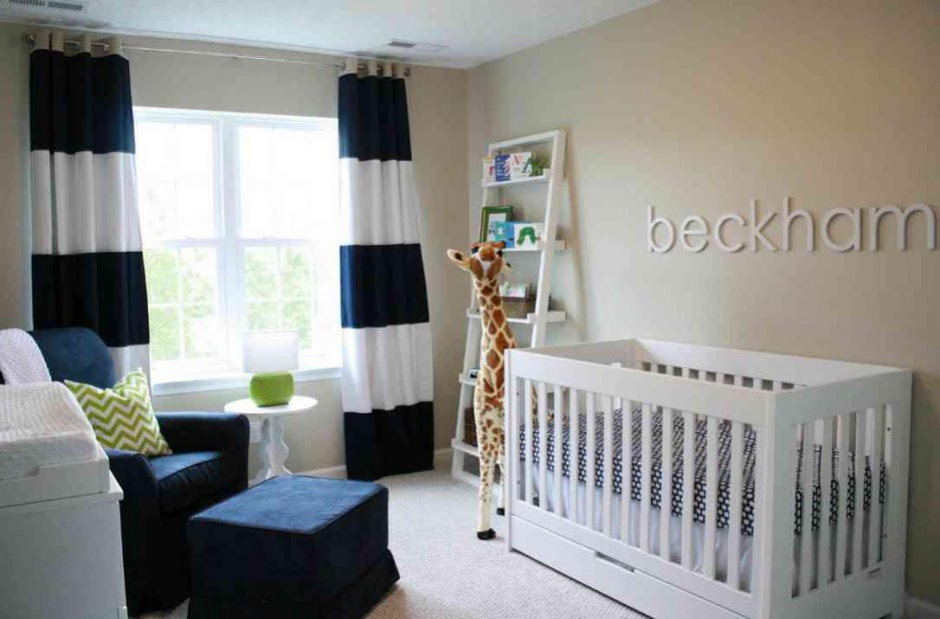

With the arrival of a baby in the house, the most speculated topic other than the gender of the baby, is ideas for decorating the babies room. A lot about the decoration depends on whether it’s a baby boy or baby girl.
The baby’s room should have pleasant and happy environment. It is considered a healthy practice if both the parents show equal participation in designing their baby’s room. This helps to create a special bond between the baby and parents even before the baby is born.
Here are 10 tips about baby’s room that will inspire you:
1. Consider the room's location and other practicalities
Choose a quiet room close to your bedroom so you don’t have to walk far at night. If the windows let a lot of light in, it may help your baby to sleep at night if you put black-out blinds or curtain linings up to keep the room dark.
2. Incorporate the style of your house into the nursery decor
Is your interiors style traditional, contemporary or perhaps an eclectic mix? It’s important that your nursery design reflects your own personal style and how you’ve decorated the rest of your home.
3. Create your own mood board
Search the internet and magazines for pictures you love and piece them together to create a mood board. This will help you to pick your colors, keep your ideas focused and pull your theme together.
4. Keep it simple
With all the gorgeous nursery furniture and accessories available, it’s easy to over-decorate. Keep it simple and decide on a single focus for the room early on, such as a piece of furniture or artwork. Choose a neutral background and mix in age-appropriate accessories and you’ll reduce the need to redecorate every few years.
5. Choose soft, tranquil colors
With the demands of a newborn, most mums need calm more than anything.
6. Choose adaptable decor
Consider how long the nursery decor will last your baby. Wallpaper with characters might have to be changed in a few years if your child finds it babyish or out-of-date. Wall stickers are a cheap, easy alternative for decorating that can be removed when your child gets older.
7. Think about safety
Create a safe zone around the cot by positioning it away from windows, heaters, lamps, wall decorations and cords. Keep furniture that your baby could clamber on to away from the cot too.
8. Select key pieces first
Select your furniture pieces before you start decorating. Parents often choose their colors first, but it's actually easier and cheaper to match paints, fabrics and wallpaper to your key furniture pieces.
9. Strike a balance between form and function
The hard part of designing your nursery is making sure it’s practical and easy to use. Consider what the room needs to be used for, the size of the room and how long it will be a nursery.
10. Think outside the box
The same can be said for wallpaper, fabric, and wall stickers. Choose items and colors that you love.
The paint aisles in your local DIY store will inspire you to mix colors you might not otherwise have thought of.
About Best Baby Room Design
The company that develops Best Baby Room Design is KinanApps. The latest version released by its developer is 2.0.
To install Best Baby Room Design on your Android device, just click the green Continue To App button above to start the installation process. The app is listed on our website since 2020-09-28 and was downloaded 0 times. We have already checked if the download link is safe, however for your own protection we recommend that you scan the downloaded app with your antivirus. Your antivirus may detect the Best Baby Room Design as malware if the download link to com.bestbabyroomdesign.kinanapps is broken.
How to install Best Baby Room Design on your Android device:
- Click on the Continue To App button on our website. This will redirect you to Google Play.
- Once the Best Baby Room Design is shown in the Google Play listing of your Android device, you can start its download and installation. Tap on the Install button located below the search bar and to the right of the app icon.
- A pop-up window with the permissions required by Best Baby Room Design will be shown. Click on Accept to continue the process.
- Best Baby Room Design will be downloaded onto your device, displaying a progress. Once the download completes, the installation will start and you'll get a notification after the installation is finished.
Version History
version 2.0
posted on 2020-09-28
- Best Home Design App for You!
- Easy to Save and Share Pictures inside the App
- Modern Art for Making New House
version 2.0
posted on 2020-09-28
- Best Home Design App for You!
- Easy to Save and Share Pictures inside the App
- Modern Art for Making New House
version 1.0
posted on 2016-12-19
Disclaimer
Official Google Play Link
We do not host Best Baby Room Design on our servers. We did not scan it for viruses, adware, spyware or other type of malware. This app is hosted by Google and passed their terms and conditions to be listed there. We recommend caution when installing it.
The Google Play link for Best Baby Room Design is provided to you by apps112.com without any warranties, representations or guarantees of any kind, so access it at your own risk.
If you have questions regarding this particular app contact the publisher directly. For questions about the functionalities of apps112.com contact us.
